Short answer: An AI software factory is a system where AI agents run every stage of building software (requirements, planning, coding, testing, deployment, documentation and handling user feedback), while people approve the decisions that matter, such as the plan and the release. Instead of speeding up one developer, it turns software delivery into a repeatable production line.
Most AI tools for software today help with one stage: writing code. That's useful, but clients and users don't pay for code. They pay for software that works, is tested, runs somewhere, comes with instructions and gets fixed when something breaks. An AI software factory is built around that whole job.
This guide explains what the term means, where it comes from, the stages a factory runs, who does what, and how it differs from coding agents and app builders.
Where the idea of a "software factory" comes from
The term is older than AI. The first company to label a software organization a "factory" was Hitachi, in 1969. Through the 1970s and 1980s, Japanese companies such as Hitachi, Toshiba, NEC and Fujitsu built software factories around standard processes, reusable components, tools and quality control. MIT professor Michael Cusumano documented this in his 1991 book Japan's Software Factories.
The goal then was the same as now: make software delivery predictable and repeatable, instead of depending on a few heroic individuals.
What has changed is who does the work inside the factory. In an AI software factory, most of the stations on the line are run by AI agents, and people move to the positions where judgment matters.
Definition in one paragraph
An AI software factory is an end-to-end system that takes a software request, from a one-line idea to a full requirements document, and turns it into shipped, supported software. Specialised agents handle each stage: research and requirements, planning, task coordination, coding, testing, deployment and documentation. People approve the plan before code is written and review the result before release. After launch, user feedback flows back into the factory as new tasks. Every run is logged, so the team can see what was built, what was tested and what it cost.
The stages of an AI software factory
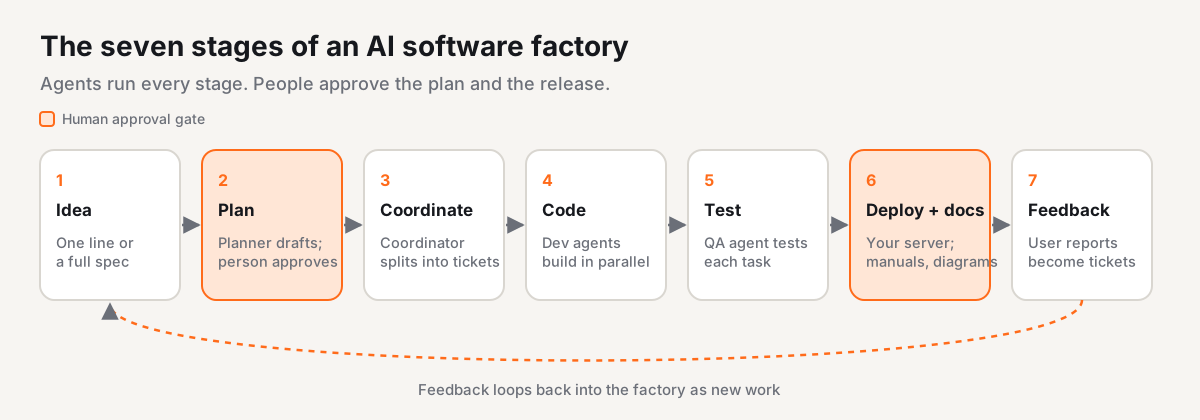
A factory works because every request moves through the same stages. Here's what each one does.
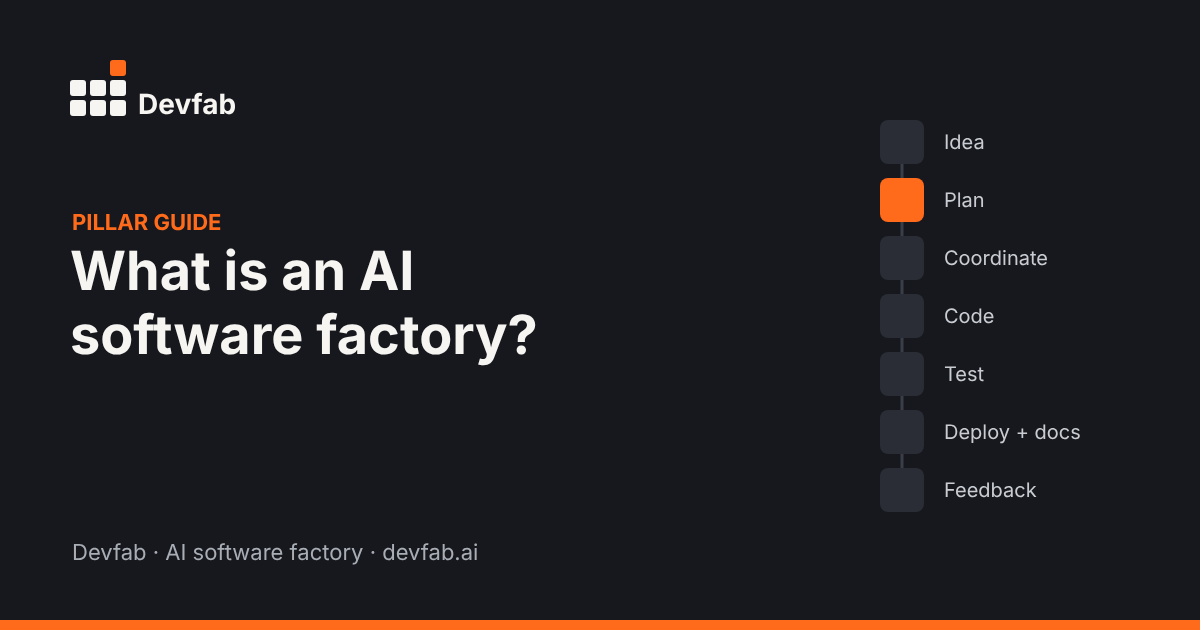
1. Idea and requirements
The input can be a short idea ("an app for booking meeting rooms") or a detailed requirements document (often called an SRS, a software requirements specification). A research agent expands a short idea into requirements: users and roles, main flows, data, rules and what "done" means.
The output of this stage is a spec a person can read and correct.
2. Plan
A planner agent turns the spec into an implementation plan: the screens, the data model, the APIs, the order of work and the risks. This is the most important checkpoint in the factory. A person reads the plan and approves or edits it before any code is written.
Why here? Because a wrong assumption is cheapest to fix in a plan. Fixing it after the code exists means rework.
3. Task coordination
A coordinator agent splits the approved plan into small tasks (tickets) and hands them to dev agents. It tracks status, dependencies and blockers, much like a project lead running a sprint board.
4. Code
Dev agents write the code for each task, run it, and update the ticket. Because tasks are small and independent where possible, several dev agents can work in parallel.
On existing codebases, this stage needs one more thing: knowledge of how the code fits together. If an agent changes a checkout function, it needs to know that payments, inventory and order emails depend on it. Factories handle this with a code-intelligence layer that maps which functions call which.
5. Tests
A QA agent tests each task: unit tests, logic, user flows and the interface. Good factories keep this separate from the agent that wrote the code, and run tests that give the same verdict every time for the same input. An AI should not grade its own homework.
6. Deploy and document
Once tests pass and a person signs off, the app is deployed, ideally to infrastructure the customer controls. The factory also produces the documents that usually get skipped: user manuals, flow diagrams and design files.
7. Feedback and maintenance
Software isn't finished at launch. Users report bugs and ask for changes. In a factory, those reports come back in as tickets: categorised, prioritised, assigned to agents, fixed, tested, and the person who reported the problem is told when it's done. That closes the loop.
Who does what: agents and people
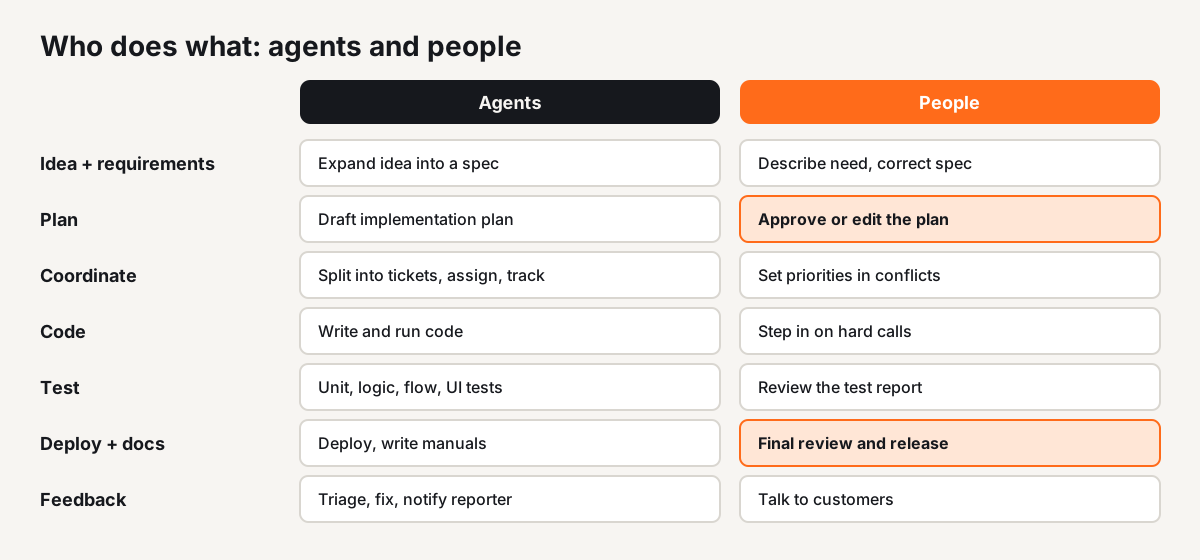
A common misunderstanding is that a software factory means "no humans". In practice, the human role gets narrower and more important.
| Stage | Agents do | People do |
|---|---|---|
| Idea and requirements | Expand the idea into a spec, ask clarifying questions | Describe the need, answer questions, correct the spec |
| Plan | Draft the implementation plan | Approve or edit the plan |
| Task coordination | Split work into tasks, assign, track | Set priorities when there's a conflict |
| Code | Write and run code, update tickets | Step in on hard calls when asked |
| Tests | Run unit, logic, flow and UI tests | Review the test report |
| Deploy and document | Deploy, write manuals and diagrams | Final review and release decision |
| Feedback | Categorise, prioritise, fix, notify | Talk to customers, decide what matters |
Four jobs stay with people in almost every factory setup: deciding what to build, approving the plan, the final review before release, and talking to customers.
How it differs from coding agents and app builders
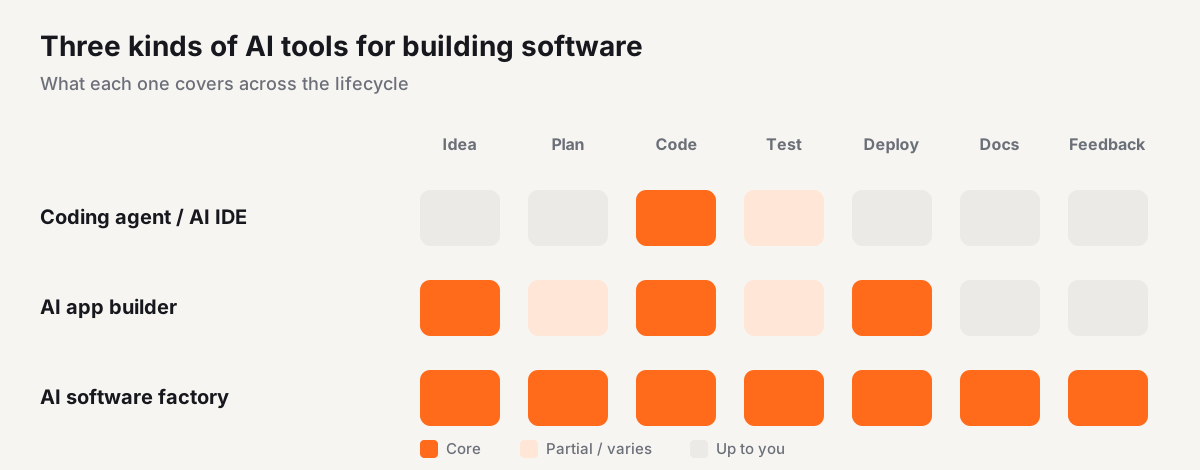
There are three broad kinds of AI tools for building software. They overlap, but they're built for different jobs.
| Aspect | Coding agent / AI IDE | AI app builder | AI software factory |
|---|---|---|---|
| Built for | A developer writing and changing code | Getting a first version on screen fast | Delivering and running software end to end |
| Typical user | Developers | Founders, non-technical builders | Agencies, product teams, businesses commissioning apps |
| Main unit of work | A code change or pull request | An app preview | A project, from spec to supported release |
| Plan approved by a person before coding | Optional | Rarely | Built in |
| Separate QA step | Up to the developer | Varies | Built in |
| Deployment | Up to the developer | Usually the builder's own hosting | Often your own infrastructure |
| Docs (manuals, diagrams) | No | Rarely | Built in |
| Feedback loop after launch | No | No | Built in |
| Team features (roles, tasks, reports) | Limited | Limited | Built in |
A short way to put it: coding agents automate the developer; a software factory automates the development lifecycle.
None of these is "better" in general. If you're a developer who wants help writing code in your editor, a coding agent is the right tool. If you want to see an idea on screen this afternoon, an app builder is fast. A factory makes sense when you need the same reliable process across many projects, or when the software has to be tested, deployed and maintained, not just demonstrated.
Why the whole lifecycle matters
If AI only speeds up coding, the bottleneck moves. Teams that adopt coding assistants often find that code review, testing and deployments become the slow part, because more code is arriving than people can check.
Google's DORA research team found the same pattern in its 2025 report on AI-assisted software development: AI adoption now has a positive relationship with delivery throughput, but software delivery instability continues to rise. The report describes AI as an amplifier: it magnifies the strengths of well-run teams and the problems of struggling ones.
A factory addresses this by automating the stages around the code too, and by putting fixed checkpoints (plan approval, separate testing, release review) where quality usually slips.
What to look for in an AI software factory
If you're evaluating tools in this category, these are the questions worth asking:
- Does a person approve the plan before code is written? If not, you'll find wrong assumptions late.
- Is testing separate from coding? The agent that wrote the code shouldn't be the only one checking it.
- Where does the code live? Ideally in your own repository, so you can leave any time and keep everything.
- Where does the app run? Can it deploy to your own servers or cloud?
- Can it work on existing code? Most real work is maintaining and extending, not starting from zero.
- Can you see the cost? Look for cost logged per task and per project, so you can quote clients with confidence.
- Does it support a team? Roles, permissions, task boards and delivery reports matter once more than one person is involved.
- Can you choose the AI model? Different stages may suit different models, and your company may have rules about which ones you can use.
An example: Devfab
Devfab is an AI software factory built around the stages above. Here's how they map:
- Requirements: describe an app in one sentence or upload a full SRS. A research agent can turn a short idea into a full spec.
- Plan: a planner agent writes the implementation plan. You approve or edit it before any code is written.
- Coordination: a coordinator agent splits the plan into tickets on a built-in task board and assigns them to dev agents. There's no fixed limit on the number of dev agents.
- Code: dev agents write code in your own GitHub account. On existing projects, Devfab's code-intelligence layer, ChainFlow, maps which functions call which, so agents can see the impact of a change before they make it.
- Tests: a QA agent runs unit, logic, flow and UI tests on each task.
- Deploy and docs: apps deploy to your own server. Devfab also produces blueprints, hi-fi designs, sequence flows, prototypes and user manuals.
- Feedback: users submit issues through a feedback module. The coordinator categorises and prioritises them, assigns them to agents, and notifies the reporter when the fix is done.
- Visibility: cost is logged after each run and shown per task and per project, for predictable cost. A Team Delivery Report shows delivery performance, and an admin portal controls who can access which projects.
- Model choice: you can choose the AI model for each agent or keep Devfab's default.
Devfab itself is built this way: two human developers and a team of agents, using Devfab to improve Devfab.
How to start
You don't need to change your whole delivery process at once. A practical way to start:
- Pick one real, small project. An internal tool your team keeps postponing is ideal.
- Write a one-page spec. Problem, users, up to five must-have flows, data, rules and what "done" means.
- Review the plan carefully. This is where you'll learn the most about how the factory thinks.
- Read the test report, not just the app. Check what was tested and what wasn't.
- Compare against your usual process. Time, rework, and how much of your team's time went to judgment versus routine work.
If you're an agency, run the same experiment on a past client project you know well. You'll quickly see where the factory fits your process and where it doesn't yet.
FAQ
What is an AI software factory?
An AI software factory is a system where AI agents run every stage of building software, from requirements and planning to coding, testing, deployment, documentation and handling feedback, with people approving the key decisions. It treats software delivery as a repeatable production line rather than a series of one-off coding sessions.
How is an AI software factory different from a coding agent?
A coding agent helps with one stage: writing and editing code. An AI software factory covers the full lifecycle around the code, including the plan a person approves, task coordination, separate testing, deployment, user documentation and turning user feedback into new work.
Do AI software factories replace developers?
No. They change what people spend time on. People decide what to build, approve plans, review releases and talk to customers. Agents do the repeatable work between those decisions.
Who should use an AI software factory?
Teams that deliver many apps or features: software agencies, outsourcing firms, product teams maintaining several products, and businesses that want a working prototype before committing to a build.
Is an AI software factory the same as a no-code app builder?
No. App builders focus on getting a first version on screen fast. A software factory adds the steps needed to run software in production: an approved plan, separate testing, deployment to your own infrastructure, documentation and a feedback loop.
Read next
- What is an AI-native software factory?
- Prototype vs MVP vs production app: what's the difference
- How AI agents handle bug reports from customers
- How to measure AI developer productivity
- Devfab vs Claude Code: which fits a team that ships client work?
- GitHub Copilot alternatives for teams that ship to production
- Emergent alternatives for teams that ship to production
Try it on a real project. Join the Devfab Beta: describe an app, approve the plan, and get a tested prototype with a user manual.
Sources: Software factories reading (PDF) (Hitachi, 1969); Cusumano, M. A., Japan's Software Factories, Oxford University Press, 1991; Google Cloud DORA, State of AI-assisted Software Development 2025.
Frequently asked questions
What is an AI software factory?
An AI software factory is a system where AI agents run every stage of building software, from requirements and planning to coding, testing, deployment, documentation and handling feedback, with people approving the key decisions. It treats software delivery as a repeatable production line rather than a series of one-off coding sessions.
How is an AI software factory different from a coding agent?
A coding agent helps with one stage: writing and editing code. An AI software factory covers the full lifecycle around the code, including the plan a person approves, task coordination, separate testing, deployment, user documentation and turning user feedback into new work.
Do AI software factories replace developers?
No. They change what people spend time on. People decide what to build, approve plans, review releases and talk to customers. Agents do the repeatable work between those decisions.
Who should use an AI software factory?
Teams that deliver many apps or features: software agencies, outsourcing firms, product teams maintaining several products, and businesses that want a working prototype before committing to a build.
Is an AI software factory the same as a no-code app builder?
No. App builders focus on getting a first version on screen fast. A software factory adds the steps needed to run software in production: an approved plan, separate testing, deployment to your own infrastructure, documentation and a feedback loop.